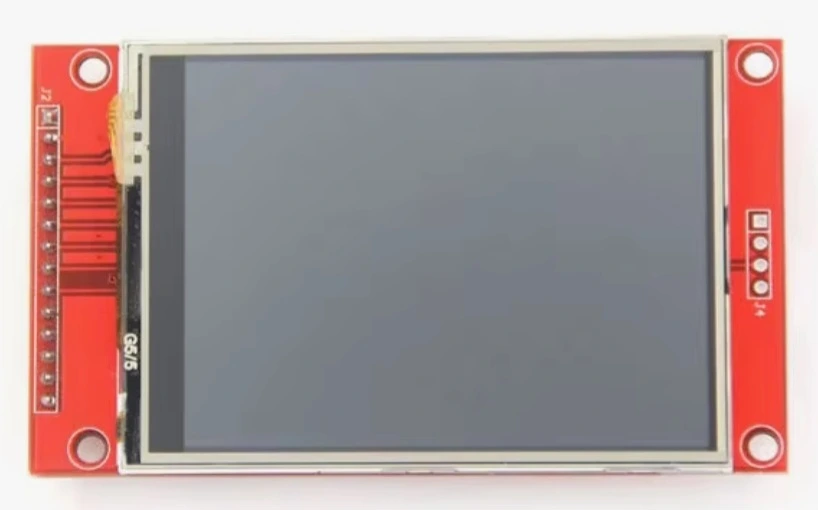
ILI9341 + XPT2046 2.8-inch Touchscreen
Various Manufacturers
ILI9341 + XPT2046 2.8-inch TFT touchscreen module combining the ILI9341 display controller with the XPT2046 resistive touch controller, offering 240×320 resolution over SPI and compatibility with ESP32 and Arduino for embedded GUI applications.
Specifications
| Display Size | 2.8 inches |
|---|---|
| Display Type | TFT LCD |
| Display Controller | ILI9341 |
| Touch Controller | XPT2046 |
| Resolution | 240 × 320 pixels |
| Touch Type | Resistive |
| Display Interface | SPI |
| Touch Interface | SPI |
| Color Depth | Up to 262K colors (ILI9341) |
| Touch | Single-Touch |
| Compatible Platforms | Arduino / ESP32 |
| Backlight | LED |
| Supply Voltage | Depends on module version |
Some links on this page are affiliate links. If you purchase through them, Embedded Nerd may earn a small commission at no additional cost to you. This helps support the website and allows us to continue creating free tutorials and guides. Thank you for your support!
Resources
You May Also Like

The ILI9341 + XPT2046 2.8-inch Touchscreen is a compact TFT display module combining a 240×320 LCD panel driven by the ILI9341 display controller with a resistive touch layer read by the XPT2046 touch controller.
It communicates over SPI and is widely available from multiple manufacturers, making it a popular choice for ESP32 and Arduino projects that need a small graphical interface with touch input.
This combination is particularly useful for embedded GUIs, control panels, sensor dashboards and portable instruments where a low-cost SPI touchscreen is sufficient.
Because these modules are produced by different manufacturers, pin labels, power circuitry and additional features can vary between versions. Always check the documentation and silkscreen of the specific module being used.
Key Features
- 2.8-inch TFT LCD panel
- 240 × 320 pixel resolution
- ILI9341 display controller
- XPT2046 resistive touch controller
- SPI communication
- Resistive single-touch interface
- LED backlight
- Arduino compatibility
- ESP32 compatibility
- Compact form factor
- Suitable for embedded graphical interfaces
The ILI9341 provides the display controller functionality, while the XPT2046 handles the resistive touchscreen input.
ILI9341 Display Controller
The ILI9341 is the controller responsible for driving the TFT panel.
It manages display memory, pixel data and the timing required to update the LCD.
When a microcontroller sends drawing commands such as text, shapes or image data, the ILI9341 processes that information and updates the corresponding pixels on the display.
On 2.8-inch modules like this one, the ILI9341 commonly communicates with the microcontroller through SPI, while 240×320 pixels is the typical resolution for this display format.
The ILI9341 handles the display side only. It does not process touchscreen input.
That function is provided by the separate XPT2046 controller.
XPT2046 Touch Controller
The XPT2046 is a dedicated controller for resistive touch panels.
Its role is to:
- Measure the position of a touch on the resistive panel
- Provide raw digital X/Y readings to the microcontroller
- Communicate with the microcontroller through SPI
- Use a separate chip-select signal from the display when sharing the SPI bus
Because the XPT2046 is designed for resistive touch, it can respond to input from a finger, stylus or gloved hand.
The controller provides raw touch measurements rather than coordinates that automatically match the display’s pixel coordinate system. Software therefore normally needs to calibrate and map the readings to the display.
ILI9341 + XPT2046 Architecture
The ILI9341 and XPT2046 are two independent devices that can share the same SPI bus:
- ILI9341 controls the TFT display
- XPT2046 handles touch input
- Both can share SCK, MOSI and MISO
- Each device uses its own CS line
- The microcontroller selects the appropriate device before communicating with it
A typical configuration therefore uses:
- TFT_CS → selects the ILI9341
- TOUCH_CS → selects the XPT2046
- SCK → shared SPI clock
- MOSI → shared SPI data
- MISO → shared SPI data
This shared-bus arrangement allows the display and touchscreen controller to operate using a relatively small number of microcontroller pins.
ILI9341 XPT2046 with ESP32
A typical example connection to an ESP32 can use the following pins:
| ESP32 | TFT/Touchscreen | Function |
|---|---|---|
| 3.3V | VCC | Power |
| GND | GND | Ground |
| GPIO18 | SCK | SPI clock |
| GPIO23 | MOSI | SPI data |
| GPIO19 | MISO | SPI data |
| GPIO5 | TFT_CS | Display chip select |
| GPIO2 | TFT_DC | Display data/command |
| GPIO4 | TFT_RST | Display reset |
| GPIO15 | TOUCH_CS | Touch chip select |
| GPIO27 | TOUCH_IRQ | Touch interrupt, when available |
This is an example ESP32 wiring configuration, not a universal pinout.
ESP32 SPI pins can be configured differently depending on the board and software.
The exact pin labels on the touchscreen module also vary between manufacturers. Check the silkscreen and documentation of the specific board before connecting it.
Voltage and Logic Levels
The exact power requirements of generic ILI9341 + XPT2046 modules depend on the particular breakout board.
The underlying controllers are low-voltage devices, but some breakout boards may include additional components such as voltage regulators or level-shifting circuitry.
For ESP32 projects, do not assume that every 2.8-inch module has identical power circuitry.
Check the module documentation and pin labels before connecting VCC or logic signals.
Arduino Compatibility
This module can be used with several Arduino-compatible boards:
- Arduino Uno
- Arduino Mega
- Arduino Nano
- ESP32
The Arduino Uno can drive an ILI9341 display, but its limited RAM makes more complex graphical applications challenging.
The Arduino Mega provides more memory and I/O than the Uno, while the Nano offers a smaller form factor with similar resource constraints to the Uno.
The ESP32 generally provides significantly more processing power and memory, making it a better choice for more advanced touchscreen interfaces.
SPI Communication
Both the display and touch controller use SPI communication.
The main SPI signals are:
- SCK — serial clock shared by the devices
- MOSI — data sent from the microcontroller
- MISO — data returned by the peripheral
- CS — chip-select signal used to select a device
The ILI9341 also uses:
- DC / RS — selects between commands and display data
- RESET — resets the display controller
The XPT2046 normally has its own TOUCH_CS signal.
Because SPI is a shared bus, the ILI9341 and XPT2046 can use the same SCK, MOSI and MISO lines while separate CS signals prevent both devices from being selected at the same time.
Touchscreen Calibration
The XPT2046 provides raw touch measurements rather than coordinates that automatically correspond to the display pixels.
The software therefore needs to map the raw values to the display coordinate system.
For a 240×320 display, the final screen coordinates normally correspond to:
- X = 0 to 239
- Y = 0 to 319
The exact calibration values depend on the physical touchscreen and module.
Calibration can also be affected by display rotation.
Common symptoms of incorrect calibration include:
- Touch appears mirrored
- X and Y are swapped
- Touch position is offset
- Touch only works correctly in part of the screen
- Touch becomes incorrect after changing screen rotation
For accurate interfaces, calibration should be performed for the specific module being used.
Display Rotation
The ILI9341 supports different display orientations, including portrait and landscape modes.
Changing the display rotation changes the relationship between the screen’s X and Y axes.
The touchscreen coordinate mapping does not automatically change simply because the display has been rotated in software.
As a result, the XPT2046 calibration and coordinate mapping may need to be adjusted when changing between portrait and landscape orientations.
Arduino Libraries
Several Arduino libraries are commonly used with this type of module.
Adafruit GFX
Provides common graphics functions such as text, lines, rectangles, circles and other drawing primitives.
Adafruit ILI9341
Provides support for communicating with ILI9341-based TFT displays.
XPT2046_Touchscreen
Provides functions for reading touch data from XPT2046-based resistive touchscreen controllers.
Pin assignments, SPI configuration and calibration values may need to be adjusted depending on the specific module and microcontroller board.
Example Projects
The ILI9341 + XPT2046 touchscreen is well suited to practical embedded projects such as:
- ESP32 touchscreen dashboard
- Sensor monitor
- Weather station display
- IoT control panel
- Home automation controller
- Touch-controlled relay interface
- Portable thermometer
- GPS display
- MQTT dashboard
- Robotics controller
The combination of graphical output and touch input makes the module particularly useful when a project needs a local user interface without relying on physical buttons.
ILI9341 + XPT2046 vs Other Displays
ST7789
ST7789 displays are common in modern compact TFT modules and are available in several resolutions and aspect ratios. The exact characteristics depend on the module.
ILI9488
ILI9488 displays are commonly used with larger and higher-resolution TFT panels. The additional pixel data required for higher-resolution screens can make SPI-based updates more demanding than with a 240×320 ILI9341 display.
SSD1306 OLED
SSD1306 displays are monochrome and have much lower resolution, but they are excellent for simple status displays and sensor readings. They do not provide touchscreen input.
Capacitive touchscreen displays
Capacitive touchscreens generally provide a smoother touch experience and may support multi-touch. They use different touch controllers and are often more expensive than resistive XPT2046 modules.
Modern ESP32 touchscreen development boards
Modern ESP32 development boards can integrate the microcontroller, display and touchscreen on a single PCB. They offer greater convenience but provide less flexibility than a separate display module.
For low-cost SPI touchscreen projects, the ILI9341 + XPT2046 combination remains a practical and widely supported option.
Troubleshooting
White screen
If the display remains white, check:
- Display power
- TFT_CS
- DC / RS
- RESET
- SPI pins
- SPI configuration
- Display library configuration
A wrong CS or DC connection can prevent the ILI9341 from being initialized correctly.
Touchscreen does not respond
Check:
- TOUCH_CS
- MISO
- MOSI
- SCK
- Touch library configuration
- Touch initialization
The display and touchscreen can share the SPI bus, but they normally require separate chip-select signals.
Touch coordinates are wrong
Incorrect touch coordinates can be caused by:
- Incorrect calibration
- Display rotation mismatch
- X/Y inversion
- Incorrect coordinate mapping
- Incorrect calibration constants
Verify the raw coordinates first and then adjust the mapping for the selected display orientation.
Display works but touch does not
If the display works correctly but touch input does not, the TFT side of the SPI bus is probably configured correctly.
The problem is more likely to be related to:
- TOUCH_CS
- MISO
- Touch controller initialization
- Touch library configuration
- Calibration
Check the touchscreen connections separately from the display connections.
Applications
The ILI9341 + XPT2046 module is suitable for projects such as:
- Embedded GUI front-ends
- ESP32 touchscreen dashboards
- Sensor and data monitoring displays
- Touch-based control panels
- IoT device interfaces
- DIY instrumentation
- Educational SPI projects
- Home automation interfaces
- Robotics controllers
- Portable embedded instruments
Some versions of these modules may also include additional hardware such as a microSD card interface. This feature varies between module versions and should not be assumed without checking the specific board.
Related Tutorials
The ILI9341 + XPT2046 touchscreen can be combined with other Embedded Nerd hardware and tutorials covering:
- ESP32 display projects
- SPI communication
- TFT displays
- Touchscreen interfaces
- ILI9341 displays
- XPT2046 touch controllers
- Arduino graphical interfaces
As dedicated ILI9341 and XPT2046 tutorials are published on Embedded Nerd, they should be linked here using descriptive anchor text.
Buy the ILI9341 + XPT2046 2.8” Touchscreen
If you’re looking for an inexpensive touchscreen module for an ESP32 or Arduino project, the ILI9341 + XPT2046 combination is a practical starting point for building graphical embedded interfaces.
Check the ILI9341 + XPT2046 2.8-inch Touchscreen on AliExpress
This page contains an affiliate link. Embedded Nerd may earn a commission from qualifying purchases at no additional cost to you.