An ESP32 touchscreen display combines a microcontroller, a graphical display, and a touch-input system, allowing you to build interactive interfaces that users can tap, drag, and control directly. Unlike a simple TFT display, a touchscreen adds a second hardware path for detecting user input, usually through a separate touch controller.
Choosing the right ESP32 touchscreen display therefore involves more than selecting a screen size. You also need to consider the touch technology, display interface, touch interface, resolution, ESP32 variant, Flash and PSRAM, power requirements, software support, and the complexity of the graphical interface you want to build.
For a compact and inexpensive project, a small SPI TFT with resistive touch can be a very practical choice. For a modern finger-driven interface, capacitive touch is often preferable. For larger 800×480 displays and more sophisticated GUIs, ESP32-S3 boards with RGB interfaces and PSRAM are particularly attractive.
If you’re not sure where to start, this table provides a useful starting point rather than a set of strict rules:
| If you need… | Recommended type |
|---|---|
| Cheapest compact touchscreen | 2.4–2.8” SPI + resistive touch |
| Simple graphical interface | 2.8–3.5” SPI TFT |
| Modern finger touch | Around 4.3” capacitive |
| Large touchscreen dashboard | 7” ESP32-S3 + RGB |
| Complex GUI | ESP32-S3 + PSRAM + LVGL |
The best choice ultimately depends on the requirements of your particular project.
What Is an ESP32 Touchscreen?
An ESP32 touchscreen setup combines three main elements:
- ESP32 or ESP32-S3: Runs the application and manages the display and touch input.
- Display panel and controller: Produces the image that appears on the LCD or TFT.
- Touch panel and controller: Detects touch input and reports coordinates or touch events to the ESP32.
The display and touch systems are usually separate. A TFT display can therefore work perfectly without touch, while a touchscreen module requires an additional touch controller and suitable software support.
This distinction is important when choosing hardware. A display advertised as compatible with ESP32 does not necessarily include a touchscreen, and a touchscreen panel does not automatically tell you which display controller or interface is being used.
A typical architecture looks like this:
                    ┌───────────────────┐
                    │       ESP32       │
                    │  Application/GUI  │
                    └─────────┬─────────┘
                              │
                 ┌────────────┴────────────┐
                 │                         │
                 ▼                         ▼
          Display interface         Touch interface
                 │                         │
                 ▼                         ▼
        Display controller          Touch controller
                 │                         │
                 ▼                         ▼
             LCD/TFT                 Touch panel
The display interface and touch interface can use different communication protocols. For example, a display can use SPI while a capacitive touch controller uses I2C.
How ESP32 Touchscreen Displays Work
At a basic level, an ESP32 touchscreen has two independent data paths:
ESP32 → display controller → LCD panel
ESP32 → touch controller → touchscreen panel
The first path sends graphical information to the display.
The second path receives information about user interaction.
Display Path
The ESP32 sends graphical data through the display interface. The display controller then drives the physical pixels of the LCD.
Depending on the hardware, the display interface may be:
- SPI
- RGB
- another parallel interface
- a board-specific display interface
Touch Path
The touch panel is connected to a touch controller. That controller determines where the user has touched the screen and communicates the resulting coordinates or touch events to the ESP32.
Touch controllers may communicate using:
- SPI
- I2C
- other interfaces depending on the hardware
ILI9341 + XPT2046
A common small-display combination is an ILI9341 TFT controller paired with an XPT2046 resistive touch controller.
The ILI9341 handles the display, while the XPT2046 handles the resistive touch panel. Both can use SPI, depending on the module’s design.
RGB Display + Capacitive Touch
On larger ESP32-S3 touchscreen boards, it is common to find an RGB display interface combined with a separate capacitive touch controller.
For example, a board may use an RGB interface for an 800×480 LCD and an I2C controller such as the GT911 for touch.
These are examples rather than universal combinations. Always check the documentation for the exact display module or development board.
Resistive vs Capacitive Touch
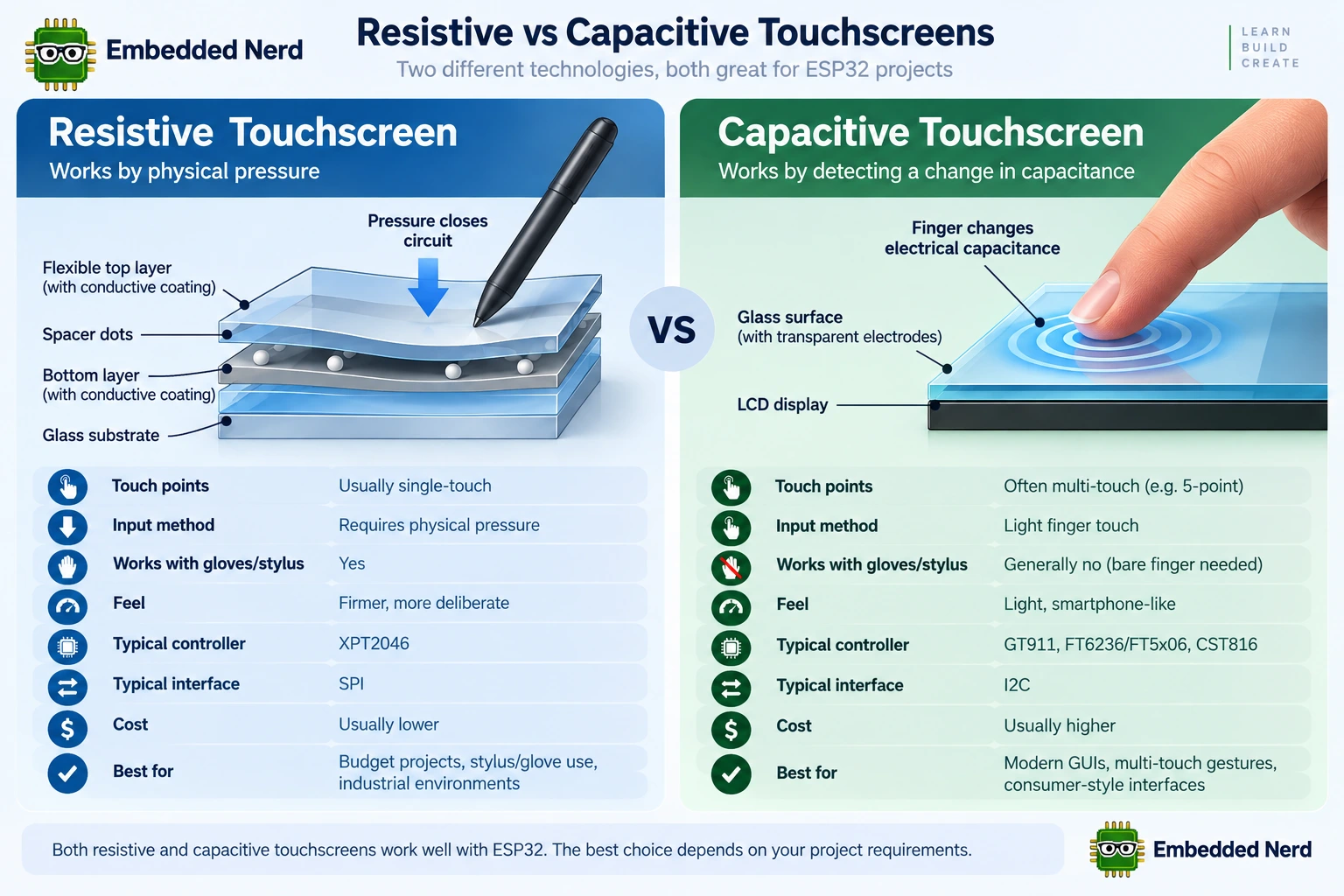
The choice between resistive and capacitive touch strongly affects how the interface feels and how the hardware behaves.
| Feature | Resistive Touch | Capacitive Touch |
|---|---|---|
| Detection method | Physical pressure | Change in electrical capacitance |
| Touch points | Usually single-touch | Often supports multi-touch |
| Finger operation | Yes | Yes |
| Stylus/glove use | Often more flexible | Depends on the panel and accessory |
| Feel | Requires physical pressure | Light finger touch |
| Typical controllers | XPT2046 and similar | GT911, FT6236/FT5x06, CST816 and similar |
| Typical interface | SPI | Often I2C |
| Cost | Often lower | Often higher |
| Typical applications | Compact/low-cost interfaces | Modern HMI and graphical interfaces |
Resistive Touchscreens
Resistive touchscreens detect physical pressure on the panel. Pressing the surface changes the electrical relationship between conductive layers, allowing the controller to determine the approximate touch position.
This makes resistive touch useful for:
- passive stylus input;
- many glove-use situations;
- inexpensive interfaces;
- deliberate button-style interaction;
- compact Arduino and ESP32 projects.
A common controller is the XPT2046.
The main trade-off is the user experience. Resistive panels require physical pressure and are usually intended for single-touch operation, so they generally do not provide the same interaction style as a modern smartphone.
Capacitive Touchscreens
Capacitive touchscreens detect changes in capacitance caused by a finger or compatible conductive object.
They are widely used in modern consumer devices because they allow light-touch interaction and can support multi-touch when the panel and controller provide it.
Common controllers found in ESP32 projects include:
- GT911;
- FT6236 / FT5x06 families;
- CST816 and related controllers.
Many capacitive touch controllers communicate with the ESP32 through I2C.
Capacitive touch is often a good choice for:
- dashboards;
- smart-home interfaces;
- modern HMIs;
- multi-screen GUIs;
- interfaces where a smartphone-like touch experience is desirable.
Which Touch Technology Should You Choose?
Neither technology is universally better.
Choose resistive touch when cost, stylus compatibility, or operation in conditions where gloves may be used is important.
Choose capacitive touch when you want a modern finger-driven interface, lighter touch interaction, or multi-touch support.
The application should determine the choice rather than the assumption that one technology is always superior.
SPI vs RGB Displays
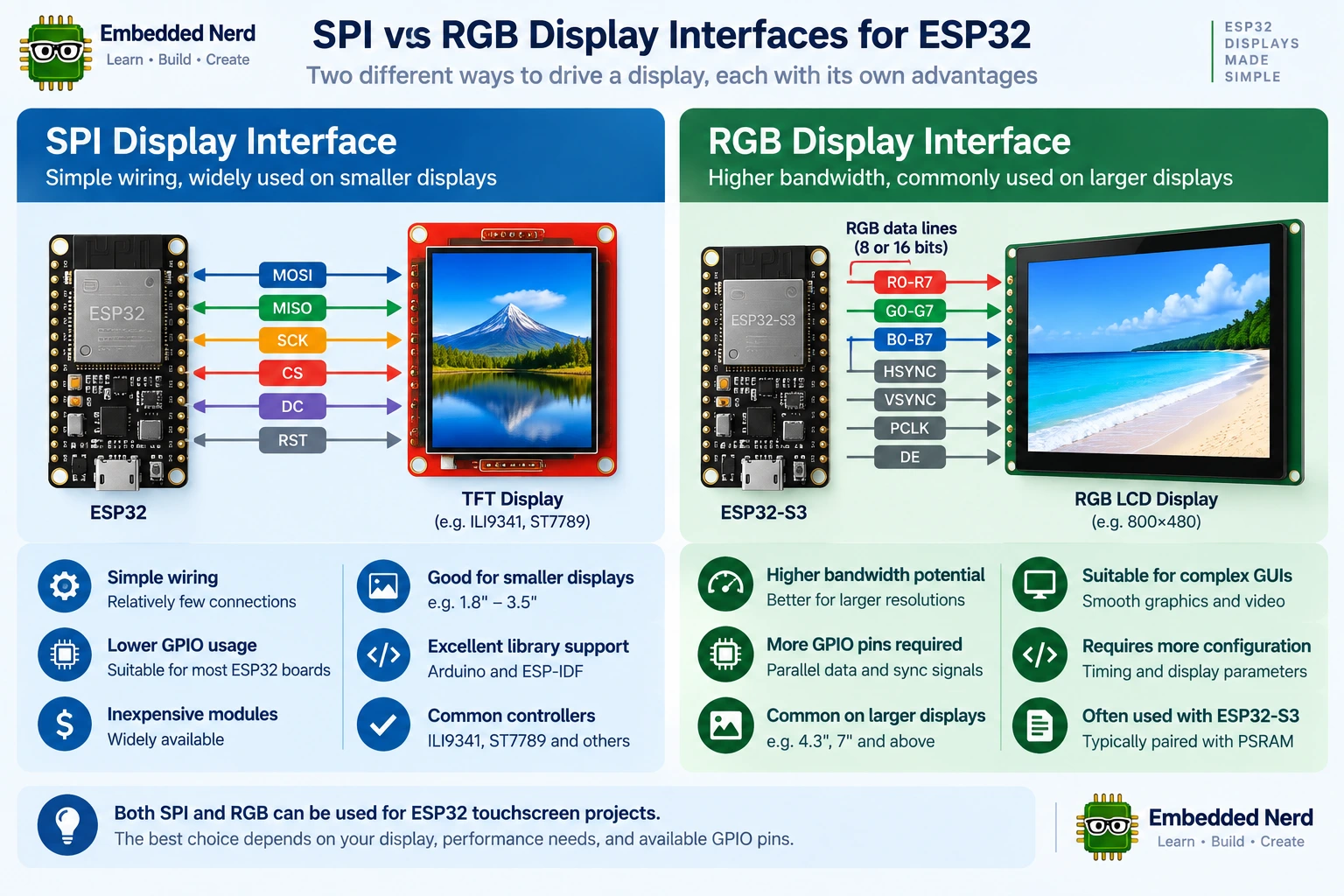
The display interface is another major factor when choosing an ESP32 touchscreen.
SPI Displays
SPI displays use a serial interface and are very common on small TFT modules.
Controllers such as the ILI9341 and ST7789 are widely used in ESP32 and Arduino projects.
Advantages include:
- relatively simple wiring;
- fewer GPIO connections;
- broad library support;
- inexpensive modules;
- good suitability for smaller displays.
The main limitation is bandwidth. Because graphical data is transferred serially, higher resolutions and frequent full-screen updates place greater demands on the interface.
For many small interfaces, however, SPI provides more than enough performance.
RGB Displays
RGB displays use a parallel RGB interface with dedicated data and timing signals.
The ESP32-S3 supports RGB LCD interfaces through the ESP-IDF LCD peripheral framework, making this type of display particularly relevant to modern ESP32-S3 GUI projects.
Many larger ESP32 touchscreen boards use RGB interfaces, particularly when working with 800×480 displays.
Advantages can include:
- higher display bandwidth potential;
- suitability for larger resolutions;
- good support for continuously updated GUIs;
- compatibility with modern graphical frameworks.
The trade-offs include:
- greater GPIO requirements;
- more complex configuration;
- greater memory requirements for graphical buffering;
- more demanding hardware design.
It is tempting to say that small displays always use SPI and large displays always use RGB, but that is not an absolute rule. Both interface types exist across different display sizes.
SPI vs RGB at a Glance
| Feature | SPI TFT | RGB LCD |
|---|---|---|
| Wiring | Relatively simple | More complex |
| GPIO usage | Lower | Higher |
| Typical use | Small/medium interfaces | Larger graphical interfaces |
| Bandwidth | More limited | Higher potential |
| Hardware complexity | Lower | Higher |
| Beginner friendliness | High | Moderate |
| LVGL suitability | Yes | Yes |
Choosing the Right ESP32 Touchscreen Size
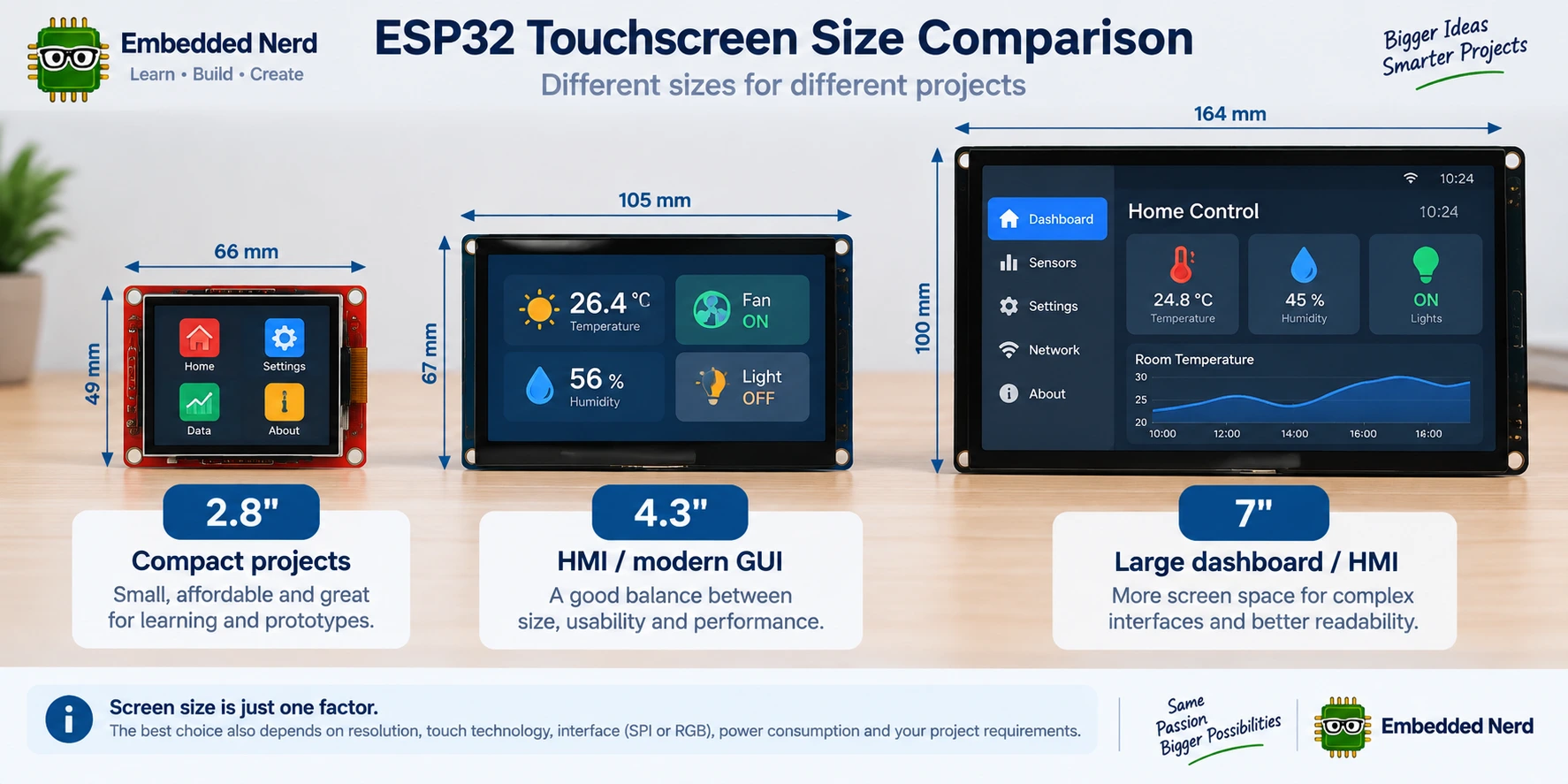
Screen size affects more than appearance. Resolution, viewing distance, power consumption, enclosure dimensions, touch-target size, and memory requirements all matter.
2.4–2.8 Inch
A 2.4–2.8-inch touchscreen is a good option for compact projects.
Typical applications include:
- small dashboards;
- sensor interfaces;
- simple menus;
- portable electronics;
- Arduino learning projects.
Common resolutions in this size range include configurations such as 240×320 or 320×240, depending on the display and orientation.
3.2–3.5 Inch
A 3.2–3.5-inch display provides more usable screen area while remaining relatively compact.
This range can work well for:
- small HMIs;
- control panels;
- graphical menus;
- IoT dashboards;
- interfaces requiring larger touch targets.
4.3 Inch
A 4.3-inch display provides a useful balance between physical size and interface space.
This size is particularly attractive when combined with:
- 800×480 resolution;
- capacitive touch;
- an ESP32-S3;
- an RGB display interface;
- PSRAM;
- LVGL.
7 Inch
A 7-inch display is useful when the physical size of the interface matters.
Typical applications include:
- smart-home dashboards;
- wall-mounted control panels;
- larger HMIs;
- industrial-style interfaces;
- IoT dashboards.
A larger screen also requires more attention to:
- enclosure design;
- mounting;
- power;
- cable routing;
- memory;
- display bandwidth.
Screen size alone does not determine the interface type. The actual display module may use SPI, RGB, or another interface.
ESP32 vs ESP32-S3 for Touchscreen Displays
The ESP32-S3 is an attractive choice for many modern touchscreen projects, particularly larger or more graphically demanding interfaces.
It uses a dual-core Xtensa LX7 processor and supports modern peripherals including USB. More importantly for touchscreen applications, many ESP32-S3 display boards combine the chip with substantial Flash and external PSRAM.
However, the board configuration matters more than simply choosing the ESP32-S3 name.
When comparing touchscreen boards, check:
- ESP32 variant;
- processor configuration;
- Flash capacity;
- PSRAM capacity;
- display interface;
- available GPIO;
- USB;
- wireless connectivity;
- additional peripherals.
A well-equipped ESP32-S3 board with external PSRAM can therefore be a much better platform for a large GUI than a small ESP32 board designed primarily for simple SPI displays.
Why PSRAM Matters for ESP32 Touchscreen Projects
Graphical interfaces can consume memory quickly.
RAM may be required for:
- framebuffers;
- drawing buffers;
- images;
- fonts;
- icons;
- LVGL objects;
- animation data;
- multiple screens.
For an RGB565 framebuffer, each pixel requires 2 bytes.
A 320×480 framebuffer therefore requires:
320 × 480 × 2 = 307,200 bytes
That’s approximately 307 KB for one full framebuffer.
An 800×480 RGB565 framebuffer requires:
800 × 480 × 2 = 768,000 bytes
That’s approximately 768 KB for one full framebuffer.
These figures represent only the raw pixel data for one framebuffer. A real application may require additional memory for drawing buffers, multiple framebuffers, fonts, images, LVGL objects, networking and application code.
This does not mean that an 800×480 framebuffer simply cannot be used with an ESP32 without PSRAM. Instead, it means that memory becomes an important design constraint. Depending on the architecture, applications may use partial drawing buffers, external PSRAM, different buffering strategies, or other optimizations.
This is one reason ESP32-S3 touchscreen boards with several megabytes of PSRAM are particularly attractive for larger GUI applications.
ESP32 Touchscreen Display Comparison
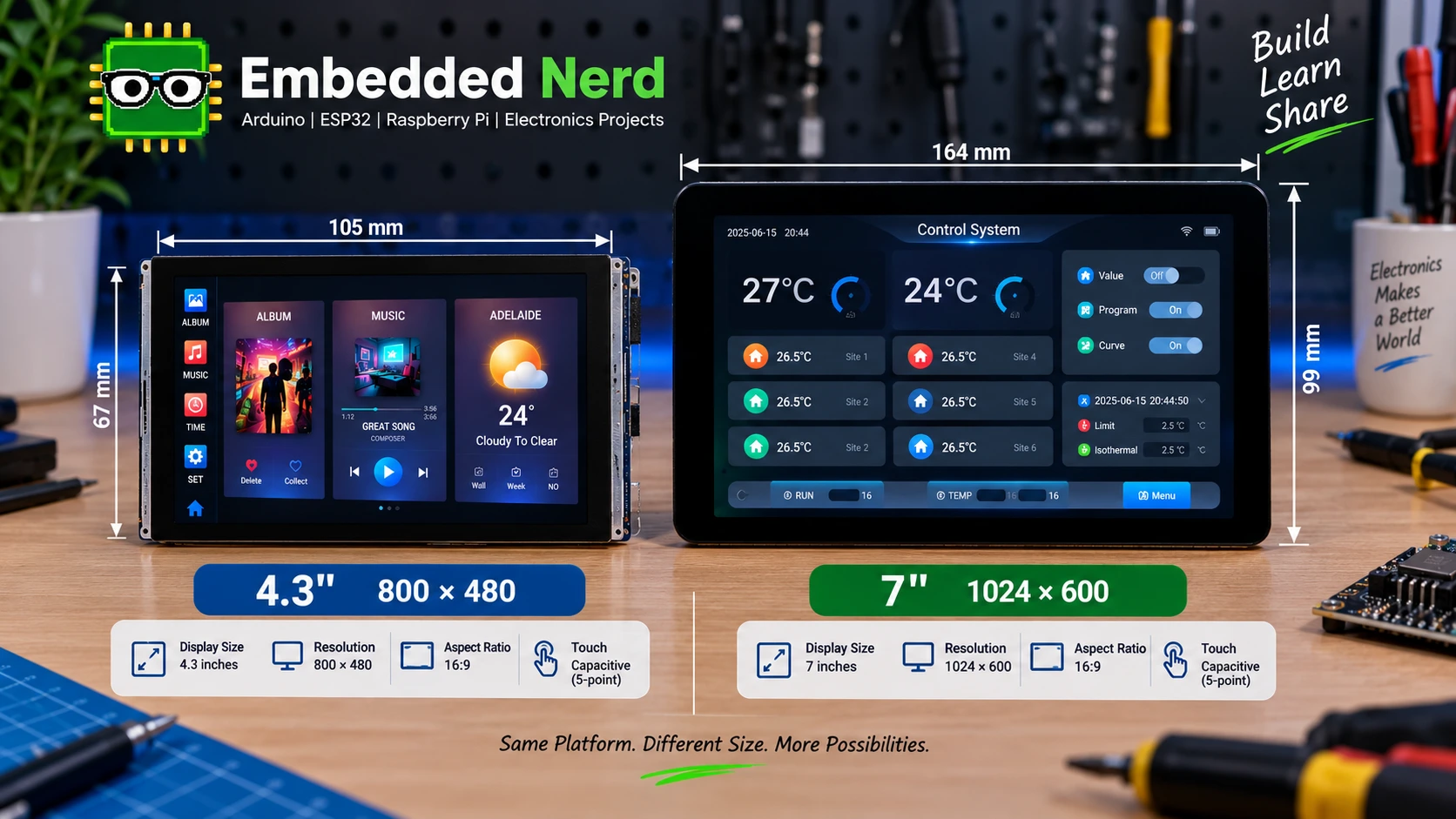
The following options represent three different levels of touchscreen project.
| ILI9341 + XPT2046 2.8” | Waveshare ESP32-S3-Touch-LCD-4.3 | Waveshare ESP32-S3-Touch-LCD-7 | |
|---|---|---|---|
| Screen size | 2.8” | 4.3” | 7” |
| Resolution | 320×240* | 800×480 | 800×480 |
| Touch technology | Resistive | Capacitive | Capacitive |
| Display interface | SPI | RGB | RGB |
| Touch interface | SPI | I2C | I2C |
| ESP32 included | Module-dependent | ESP32-S3 | ESP32-S3 |
| PSRAM | Module-dependent | 8 MB | 8 MB |
| Flash | Module-dependent | 16 MB | Check exact version |
| Intended use | Compact projects | Modern GUI/HMI | Large dashboards/HMI |
| Complexity | Low | Moderate | Moderate–High |
| Best for | Budget/prototyping | Balanced touchscreen GUI | Large-screen interfaces |
*Resolution and exact configuration should be checked against the specific ILI9341 module before purchase.
For the Waveshare boards, always verify the exact hardware version or SKU because memory configurations can vary between versions.
Recommended ESP32 Touchscreen Displays
ILI9341 + XPT2046 2.8-inch Touchscreen
ILI9341 + XPT2046 2.8-inch Touchscreen
This is a compact SPI TFT solution with resistive touch.
It is particularly attractive for:
- low-cost projects;
- learning;
- Arduino projects;
- ESP32 prototypes;
- compact graphical interfaces;
- projects where resistive touch is acceptable.
The main advantage is the relatively simple architecture and low cost. The trade-off is the smaller screen and pressure-based resistive touch experience.
Waveshare ESP32-S3-Touch-LCD-4.3
Waveshare ESP32-S3-Touch-LCD-4.3
This integrated ESP32-S3 touchscreen platform is aimed at more capable graphical applications.
The documented configuration used for this guide includes:
- ESP32-S3;
- 16 MB Flash;
- 8 MB PSRAM;
- 4.3-inch IPS LCD;
- 800×480 resolution;
- RGB display interface;
- capacitive touch;
- GT911 touch controller;
- I2C touch interface;
- LVGL suitability.
This is a strong option when you want a modern finger-driven interface without building the display and ESP32 hardware as separate modules.
Waveshare ESP32-S3-Touch-LCD-7
Waveshare ESP32-S3-Touch-LCD-7
The 7-inch version is aimed at larger dashboards and HMI-style projects.
The documented configuration includes:
- ESP32-S3;
- 16 MB Flash on the relevant version;
- 8 MB PSRAM;
- 7-inch IPS LCD;
- 800×480 resolution;
- RGB display interface;
- capacitive touch;
- 5-point touch;
- I2C touch;
- Wi-Fi;
- Bluetooth;
- CAN;
- RS485;
- USB;
- TF card support;
- LVGL suitability.
Because Waveshare offers different versions, verify the exact Flash configuration and other hardware details against the version you are purchasing.
The combination of a large display, ESP32-S3 and additional interfaces makes it particularly interesting for HMI, smart-home and embedded control-panel applications.
Which ESP32 Touchscreen Should You Choose?
Choose the ILI9341 + XPT2046 if:
- You want a low-cost compact solution.
- You are learning about TFT displays and touch controllers.
- SPI is sufficient for your interface.
- You are prototyping.
- Resistive touch is acceptable.
Choose the 4.3-inch ESP32-S3 board if:
- You want capacitive touch.
- You want an integrated ESP32-S3 platform.
- You need 800×480 resolution.
- You want a modern graphical interface.
- You are interested in LVGL.
- You want a good balance between physical size and GUI capability.
Choose the 7-inch ESP32-S3 board if:
- Screen size is important.
- You are building an HMI or dashboard.
- You want a large LVGL interface.
- You need additional interfaces such as CAN or RS485.
- The physical user interface is a major part of the project.
The key decision is often not simply “which display is best?” but rather:
Do you need a compact SPI touchscreen, or an integrated ESP32-S3 RGB touchscreen platform?
Once that is decided, choosing between a 4.3-inch and 7-inch display becomes mainly a question of physical size, viewing distance, enclosure requirements, and the interface you want to build.
Using an ILI9341 + XPT2046 with ESP32
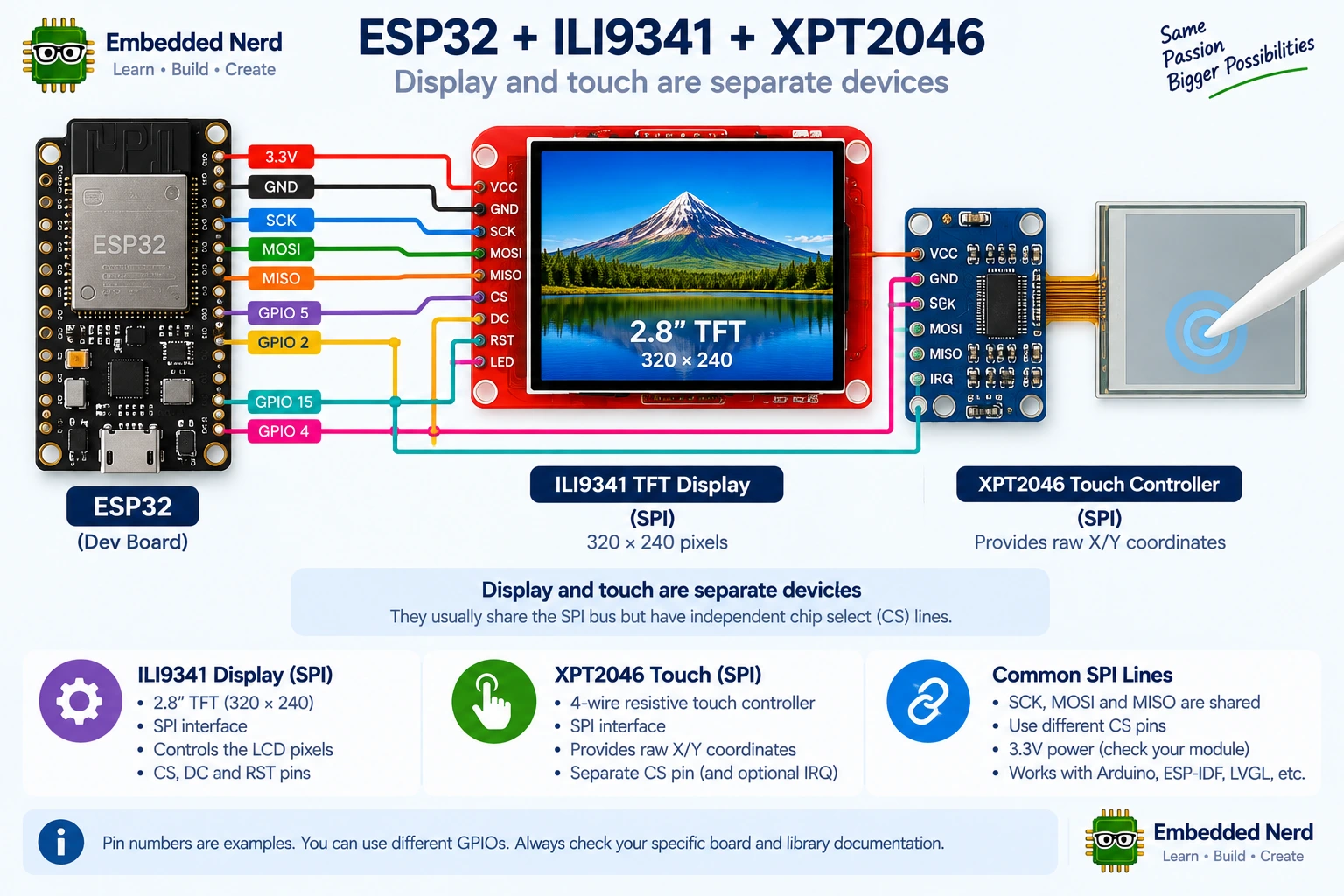
An ILI9341 + XPT2046 module is a useful way to learn how the display and touch paths work together.
The general architecture is:
ESP32
 │
 ├── SPI ──> ILI9341 display controller
 │
 └── SPI ──> XPT2046 touch controller
The two devices can share the main SPI signals while using separate chip-select signals, depending on the module and wiring.
Example Hardware Configuration
A typical SPI setup may include:
Display:
  CS   -> GPIO 5
  DC   -> GPIO 2
  RST  -> GPIO 4
  MOSI -> GPIO 23
  SCK  -> GPIO 18
  MISO -> GPIO 19

Touch:
  T_CS  -> GPIO 15
  T_IRQ -> GPIO 27 (optional)
These GPIO assignments are an example configuration only, not universal ESP32 touchscreen pin assignments.
The exact pins depend on the ESP32 board, touchscreen module, and wiring configuration. Always verify the module’s pinout before connecting it.
Software
The general software flow is:
Initialize SPI
        ↓
Initialize display
        ↓
Initialize touch controller
        ↓
Set display orientation
        ↓
Draw interface
        ↓
Read touch coordinates
        ↓
Convert raw coordinates to screen coordinates
Popular Arduino libraries include display libraries such as TFT_eSPI and dedicated XPT2046 touch libraries. The correct library and configuration depend on the hardware and development environment.
Touch Calibration
Resistive touch controllers return raw coordinate values. These values do not necessarily correspond directly to display pixels.
Calibration maps:
Raw X/Y
   ↓
Calibration and rotation
   ↓
Screen X/Y
   ↓
GUI input
Calibration values are module-dependent.
Do not assume that calibration values found online for another XPT2046 module will work correctly on yours.
Instead:
- Read the raw touch coordinates.
- Determine the usable minimum and maximum values.
- Account for display rotation.
- Map the calibrated coordinates to screen pixels.
- Test the result across several points on the display.
Many touchscreen libraries provide calibration examples that can simplify this process.
Using LVGL with ESP32 Touchscreens
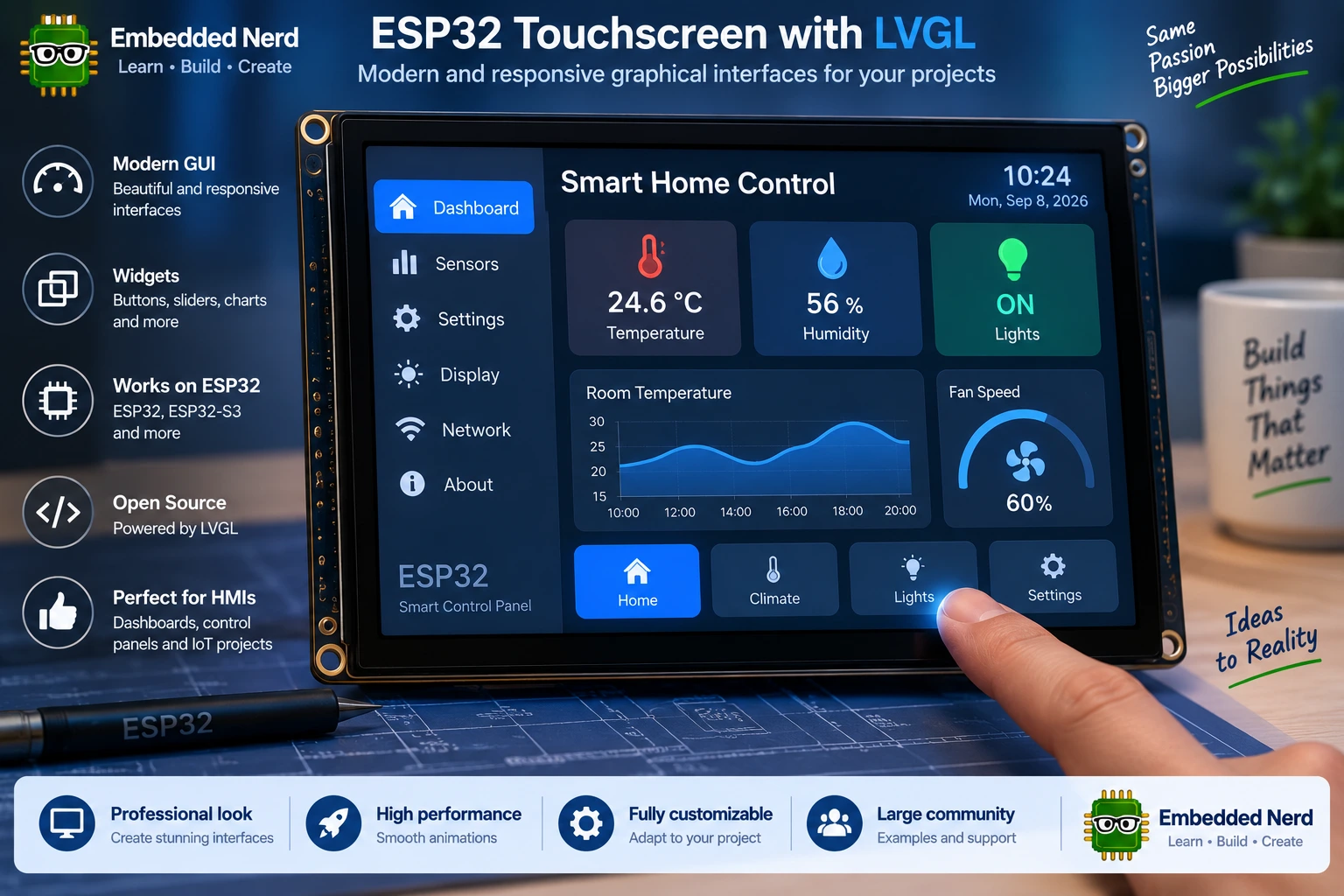
LVGL (Light and Versatile Graphics Library) is a popular embedded GUI framework for creating graphical interfaces.
Instead of manually drawing every button, label and screen, LVGL provides higher-level GUI objects such as:
- buttons;
- sliders;
- gauges;
- charts;
- menus;
- lists;
- labels;
- animations;
- multiple screens.
LVGL separates the GUI from the low-level display and input drivers. The display driver provides a way to render the GUI, while the input driver provides touch events.
This makes LVGL particularly useful once an ESP32 touchscreen project becomes more complex than a few manually drawn controls.
Why ESP32-S3 + PSRAM Is Attractive for LVGL
A simple GUI can often run on a conventional ESP32.
As the interface grows, however, memory requirements increase because of:
- fonts;
- images;
- icons;
- multiple screens;
- widget objects;
- drawing buffers;
- framebuffers;
- animations.
An ESP32-S3 board with external PSRAM therefore provides useful memory headroom for larger touchscreen interfaces.
This article is intended as an overview rather than a complete LVGL tutorial. A dedicated Embedded Nerd tutorial can cover the actual LVGL setup, display driver configuration, touch input and widgets for specific ESP32-S3 touchscreen hardware.
Common ESP32 Touchscreen Problems
Touch Coordinates Are Wrong
Incorrect touch coordinates are often related to:
- calibration;
- display rotation;
- axis inversion;
- X/Y mapping;
- incorrect touch-controller configuration.
Check the raw coordinates first, then apply the required transformation.
Display Works but Touch Does Not
Remember that the display and touch systems are separate.
Check:
- touch controller wiring;
- SPI chip-select configuration;
- I2C wiring and address where applicable;
- reset or interrupt lines where required;
- touch-controller initialization;
- the selected touch driver.
A working display does not prove that the touch controller is correctly configured.
Screen Is Blank
A blank display can result from several issues.
Check:
- power;
- ground;
- wiring;
- display controller selection;
- initialization;
- SPI configuration;
- RGB timing/configuration where applicable;
- reset;
- backlight.
The exact cause depends on the hardware.
ESP32 Resets When the Display Starts
Possible causes include:
- inadequate power;
- current demand from the display or backlight;
- wiring problems;
- software crashes;
- memory allocation failures;
- framebuffer configuration;
- other peripheral conflicts.
For larger displays, investigate both power and memory rather than assuming one universal cause.
Large Displays Run Out of Memory
An 800×480 RGB565 framebuffer requires about 768 KB for one complete buffer.
An application can require substantially more memory once you add:
- additional buffers;
- fonts;
- images;
- LVGL objects;
- application data;
- networking.
PSRAM can therefore be particularly useful for larger RGB touchscreen projects.
ESP32 Touchscreen Buying Guide
Before buying an ESP32 touchscreen display, check the following.
Display Size and Resolution
Choose a screen that fits both the interface and the enclosure.
A larger display is not automatically better if the project needs to remain compact.
Touch Technology
Decide whether you need:
- resistive touch;
- capacitive touch;
- single-touch;
- multi-touch;
- stylus use;
- glove compatibility.
Display Interface
Check whether the display uses:
- SPI;
- RGB;
- another interface.
The interface affects GPIO requirements, bandwidth and software configuration.
Touch Interface
The touch controller may use:
- SPI;
- I2C;
- another board-specific interface.
The touch interface is independent of the display interface.
ESP32 Model
Check the actual microcontroller on the board.
For more demanding GUIs, ESP32-S3 boards can be particularly attractive, especially when paired with PSRAM.
Flash and PSRAM
Do not compare boards only by the ESP32 family name.
Check the actual:
- Flash capacity;
- PSRAM capacity;
- available RAM;
- memory configuration.
Power
Larger and brighter displays can have greater power requirements.
Make sure the power supply and USB/power input are appropriate for the complete board and display system.
Controller Availability
Knowing the exact display and touch controllers makes software development considerably easier.
For example, identifying an ILI9341 or XPT2046 allows you to search for compatible libraries and examples.
Documentation
Documentation can be more important than a small difference in purchase price.
A cheap display with poor documentation can take considerably longer to integrate than a better-documented board.
Arduino and ESP-IDF Support
Check whether the board and its display/touch controllers have examples or libraries for your preferred development environment.
ESP-IDF provides LCD peripheral APIs, while Arduino projects have access to numerous community and manufacturer-supported display libraries.
LVGL Support
If you plan to build a sophisticated GUI, check whether the board has:
- LVGL examples;
- display driver support;
- touch input support;
- sufficient memory;
- suitable buffering.
Physical Dimensions
Check:
- PCB dimensions;
- LCD dimensions;
- mounting holes;
- connector positions;
- cable routing;
- enclosure availability.
Product Lifecycle
For a project expected to remain in production for a long time, availability and documentation matter.
A slightly more expensive display that remains available and well supported may be a better choice than a cheaper module with uncertain support.
Frequently Asked Questions
What is the best touchscreen for ESP32?
There is no single best ESP32 touchscreen.
A compact SPI TFT with resistive touch such as an ILI9341 + XPT2046 can be a good choice for low-cost and learning projects. An integrated ESP32-S3 board with a capacitive RGB display is generally more suitable for modern, GUI-heavy applications.
Can ESP32 use a touchscreen?
Yes. ESP32 and ESP32-S3 boards can work with many touchscreen displays.
The display and touch controllers may communicate using different interfaces, such as SPI for the display and I2C for a capacitive touch controller.
What is the difference between resistive and capacitive ESP32 touchscreens?
Resistive touchscreens detect physical pressure and are often suitable for styluses and many glove-use situations.
Capacitive touchscreens detect changes in capacitance and generally provide a lighter, more smartphone-like touch experience. Compatible controllers can also support multi-touch.
Does ESP32 support capacitive touchscreens?
Yes.
The ESP32 can communicate with external capacitive touch controllers, including controllers commonly found on ESP32 touchscreen boards.
The exact controller and interface depend on the display module.
Can ESP32 drive a 7-inch touchscreen?
Yes, suitable ESP32 hardware can drive 7-inch touchscreen systems.
Larger displays require more attention to display bandwidth, memory, buffering, power and physical integration. ESP32-S3 boards with RGB displays and PSRAM are particularly attractive for this class of application.
What is the best ESP32-S3 touchscreen?
The best option depends on the application.
A 4.3-inch 800×480 capacitive display is a useful balance for many modern interfaces, while a 7-inch display is more appropriate when a large dashboard or HMI is required.
Does ESP32 touchscreen work with LVGL?
Yes. LVGL is widely used for ESP32 touchscreen interfaces.
It provides widgets and GUI functionality that can make complex interfaces significantly easier to develop.
Do ESP32 touchscreens use SPI?
Many do, especially smaller TFT displays and resistive touch controllers.
However, larger ESP32 touchscreen boards may use RGB for the display while using I2C for capacitive touch.
Do ESP32 touchscreens use I2C?
Many capacitive touch controllers use I2C.
It is common for an RGB display and I2C touch controller to coexist on the same ESP32-S3 touchscreen board.
How much PSRAM does an ESP32 touchscreen need?
There is no universal requirement.
A small SPI touchscreen with a simple interface may work without PSRAM.
Larger RGB displays and complex LVGL interfaces can benefit substantially from several megabytes of PSRAM, particularly when framebuffers, images and multiple GUI objects are involved.
Is an ESP32-S3 better for touchscreen displays?
For many larger or more graphically demanding projects, the ESP32-S3 is an attractive choice.
However, it is not necessary for every touchscreen project. A small SPI touchscreen can still work very well with a conventional ESP32.
Related Embedded Nerd Tutorials
- ESP32 OLED Tutorial: Wiring, Code & Display Guide
- ST7789 TFT Display
- ILI9341 + XPT2046 2.8-inch Touchscreen
- Waveshare ESP32-S3-Touch-LCD-4.3
- Waveshare ESP32-S3-Touch-LCD-7
Conclusion
Choosing an ESP32 touchscreen starts with understanding that the display and touch system are separate parts of the hardware.
For compact, inexpensive and learning-focused projects, an SPI TFT with resistive touch such as the ILI9341 + XPT2046 remains a practical option.
For a modern finger-driven interface, an integrated ESP32-S3 touchscreen with an 800×480 capacitive display provides a stronger platform. The 4.3-inch option offers a good balance between physical size and GUI capability, while the 7-inch version is better suited to large dashboards and HMI applications.
The most important factors to compare are:
- touch technology;
- display interface;
- touch interface;
- resolution;
- ESP32 model;
- Flash;
- PSRAM;
- power requirements;
- software support;
- LVGL support;
- documentation;
- physical dimensions.
You do not necessarily need the largest or most powerful display. A small SPI touchscreen may be the right answer for a compact sensor interface, while an ESP32-S3 with RGB, PSRAM and LVGL can make much more sense for a full-screen HMI.
Use this guide as the starting point, then move to the specific hardware documentation and product pages before finalizing your design.