ESP32 Snake Game with MPU6050 and OLED Display
Learn how to build a classic Snake game using an ESP32, an MPU6050 motion sensor and a 0.96-inch SSD1306 OLED Display.
Instead of pressing buttons, you control the snake by tilting the MPU6050 sensor, making this a fun project for learning ESP32 graphics, sensors and game programming.
In this tutorial you’ll learn:
- ESP32 Snake Game wiring
- MPU6050 tilt controls
- OLED display connections
- Required libraries
- Complete Arduino code
- GitHub source code
- Project improvements
Project Overview
This project combines three popular ESP32 modules:
- ESP32 development board
- MPU6050 accelerometer and gyroscope
- SSD1306 OLED display
The MPU6050 detects the board’s orientation and changes the snake’s direction.
The OLED Display shows:
- Snake
- Food
- Score
- Game Over screen
Required Hardware
| Component | Link |
|---|---|
| ESP32 Development Board | Recommended ESP32 Board |
| MPU6050 Module | MPU6050 Motion Sensor |
| SSD1306 OLED Display | 0.96” OLED Display |
| Breadboard | Breadboard Kit |
| Jumper Wires | Jumper Wire Kit |
ESP32 Snake Game Wiring
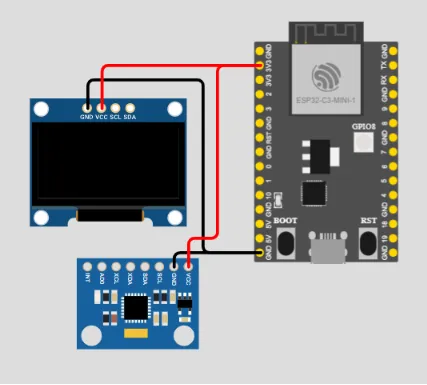
ESP32 Connections
| ESP32 | MPU6050 | OLED SSD1306 |
|---|---|---|
| 3.3V | VCC | VCC |
| GND | GND | GND |
| GPIO21 | SDA | SDA |
| GPIO22 | SCL | SCL |
Since both devices use I2C communication, they can share the same SDA and SCL pins.
How the Game Works
The snake moves continuously across the OLED display.
Tilting the MPU6050 changes its direction:
- Tilt Left → Move Left
- Tilt Right → Move Right
- Tilt Forward → Move Up
- Tilt Backward → Move Down
Every time the snake eats food:
- Score increases
- Snake becomes longer
- Game speed gradually increases
If the snake hits:
- A wall
- Itself
The game ends and displays the final score.
Install Required Libraries
Open Arduino IDE.
Go to:
Sketch
→ Include Library
→ Manage Libraries
Install the following libraries:
- Adafruit SSD1306
- Adafruit GFX
- MPU6050
- Wire
ESP32 Snake Game Code
The complete project is available on GitHub.
// =====================================================
// Embedded Nerd
// ESP32 Snake Game
// MPU6050 + OLED Display
// https://embeddednerd.com
// =====================================================

// ==========================================
// Libraries
// ==========================================

#include <Wire.h>
#include <Adafruit_GFX.h>
#include <Adafruit_SSD1306.h>
#include <MPU6050_tockn.h>

// ==========================================
// OLED Display Configuration
// ==========================================

#define SCREEN_WIDTH 128
#define SCREEN_HEIGHT 64

Adafruit_SSD1306 display(
  SCREEN_WIDTH,
  SCREEN_HEIGHT,
  &Wire,
  -1
);

// ==========================================
// MPU6050 Motion Sensor
// ==========================================

MPU6050 mpu6050(Wire);

// ==========================================
// Game Configuration
// ==========================================

const int grid = 4;

// Snake body coordinates

int snakeX[200];
int snakeY[200];

// Initial snake length

int snakeLength = 5;

// Current movement direction

int dirX = 1;
int dirY = 0;

// Buffered next direction
// Prevents instant reverse movement

int nextDirX = 1;
int nextDirY = 0;

// Food position

int foodX;
int foodY;

// Game timing

unsigned long lastMove = 0;

// Dynamic game speed

int gameSpeed = 120;

// Game states

bool gameOver = false;
bool gameStarted = false;

// Score system

int score = 0;
int bestScore = 0;

// Tilt sensitivity

float threshold = 0.35;

// ==========================================
// Spawn Food
// ==========================================

void spawnFood() {

  foodX = random(0, SCREEN_WIDTH / grid) * grid;
  foodY = random(0, SCREEN_HEIGHT / grid) * grid;
}

// ==========================================
// Reset Game State
// ==========================================

void resetGame() {

  snakeLength = 5;

  score = 0;

  dirX = 1;
  dirY = 0;

  nextDirX = 1;
  nextDirY = 0;

  gameOver = false;

  // Create initial snake body

  for (int i = 0; i < snakeLength; i++) {

    snakeX[i] = 40 - i * grid;
    snakeY[i] = 20;
  }

  spawnFood();
}

// ==========================================
// Setup
// ==========================================

void setup() {

  Serial.begin(115200);

  // Initialize I2C

  Wire.begin();

  // Lower I2C speed for stability

  Wire.setClock(100000);

  // Initialize OLED display

  display.begin(SSD1306_SWITCHCAPVCC, 0x3C);

  display.clearDisplay();
  display.display();

  // Initialize MPU6050

  mpu6050.begin();

  // Gyroscope calibration

  mpu6050.calcGyroOffsets(true);

  // Random seed for food spawning

  randomSeed(millis());

  resetGame();
}

// ==========================================
// Main Loop
// ==========================================

void loop() {

  // ==========================================
  // Start Screen
  // ==========================================

  if (!gameStarted) {

    mpu6050.update();

    float x = mpu6050.getAccX();
    float y = mpu6050.getAccY();

    display.clearDisplay();

    display.setTextSize(2);
    display.setTextColor(WHITE);

    display.setCursor(30, 5);
    display.println("SNAKE");

    display.setTextSize(1);

    display.setCursor(10, 28);
    display.println("Tilt to play");

    display.display();

    // Start game when tilt is detected

    if (abs(x) > 0.5 || abs(y) > 0.5) {

      gameStarted = true;

      delay(300);
    }

    return;
  }

  // ==========================================
  // Game Over Screen
  // ==========================================

  if (gameOver) {

    display.clearDisplay();

    display.setTextSize(2);
    display.setTextColor(WHITE);

    display.setCursor(10, 5);
    display.println("GAME");

    display.setCursor(15, 25);
    display.println("OVER");

    display.setTextSize(1);

    display.setCursor(30, 50);
    display.print("SCORE: ");
    display.println(score);

    display.display();

    delay(2500);

    gameStarted = false;

    resetGame();

    return;
  }

  // ==========================================
  // Read MPU6050 Sensor
  // ==========================================

  mpu6050.update();

  // Use accelerometer values
  // Better for responsive tilt controls

  float x = mpu6050.getAccX();
  float y = mpu6050.getAccY();

  // ==========================================
  // Dynamic Speed System
  // ==========================================

  float tilt = max(abs(x), abs(y));

  if (tilt > threshold) {

    gameSpeed = map(
      constrain(tilt * 100, 35, 100),
      35,
      100,
      150,
      60
    );

  } else {

    gameSpeed = 150;
  }

  // ==========================================
  // Tilt Controls
  // ==========================================

  if (abs(x) > abs(y)) {

    // Move Up

    if (x > threshold) {

      if (!(dirX == 0 && dirY == -1)) {

        nextDirX = 0;
        nextDirY = 1;
      }
    }

    // Move Down

    else if (x < -threshold) {

      if (!(dirX == 0 && dirY == 1)) {

        nextDirX = 0;
        nextDirY = -1;
      }
    }

  } else {

    // Move Right

    if (y > threshold) {

      if (!(dirX == -1 && dirY == 0)) {

        nextDirX = 1;
        nextDirY = 0;
      }
    }

    // Move Left

    else if (y < -threshold) {

      if (!(dirX == 1 && dirY == 0)) {

        nextDirX = -1;
        nextDirY = 0;
      }
    }
  }

  // ==========================================
  // Snake Movement
  // ==========================================

  if (millis() - lastMove > gameSpeed) {

    lastMove = millis();

    // Apply next direction

    dirX = nextDirX;
    dirY = nextDirY;

    // Move snake body

    for (int i = snakeLength; i > 0; i--) {

      snakeX[i] = snakeX[i - 1];
      snakeY[i] = snakeY[i - 1];
    }

    // Move snake head

    snakeX[0] += dirX * grid;
    snakeY[0] += dirY * grid;

    // ==========================================
    // Screen Wrapping
    // ==========================================

    if (snakeX[0] < 0)
      snakeX[0] = SCREEN_WIDTH - grid;

    if (snakeX[0] >= SCREEN_WIDTH)
      snakeX[0] = 0;

    if (snakeY[0] < 0)
      snakeY[0] = SCREEN_HEIGHT - grid;

    if (snakeY[0] >= SCREEN_HEIGHT)
      snakeY[0] = 0;

    // ==========================================
    // Self Collision Detection
    // ==========================================

    for (int i = 1; i < snakeLength; i++) {

      if (snakeX[0] == snakeX[i] &&
          snakeY[0] == snakeY[i]) {

        gameOver = true;
      }
    }

    // ==========================================
    // Food Collection
    // ==========================================

    if (snakeX[0] == foodX &&
        snakeY[0] == foodY) {

      snakeLength++;

      score++;

      // Save best score

      if (score > bestScore) {
        bestScore = score;
      }

      spawnFood();
    }
  }

  // ==========================================
  // Render Game
  // ==========================================

  display.clearDisplay();

  // Draw food

  display.fillRect(
    foodX,
    foodY,
    grid,
    grid,
    WHITE
  );

  // Draw snake

  for (int i = 0; i < snakeLength; i++) {

    display.fillRect(
      snakeX[i],
      snakeY[i],
      grid,
      grid,
      WHITE
    );
  }

  // Draw score

  display.setTextSize(1);

  display.setCursor(0, 0);

  display.print(score);

  display.display();
}
The complete sketch includes:
- Snake movement
- Food generation
- Collision detection
- Score counter
- MPU6050 controls
- OLED graphics
Reading the MPU6050
The MPU6050 continuously measures acceleration on three axes.
Typical logic:
if(ax > 8000)
    direction = RIGHT;

if(ax < -8000)
    direction = LEFT;

if(ay > 8000)
    direction = DOWN;

if(ay < -8000)
    direction = UP;
Threshold values help prevent accidental direction changes caused by small movements.
Drawing the Snake
Each snake segment is represented as a small square.
The OLED is refreshed every frame by:
- Clearing the display
- Drawing the snake
- Drawing food
- Updating the score
This creates smooth movement while keeping memory usage low.
Game Features
Current features include:
- Tilt controls
- Score counter
- Random food generation
- Snake growth
- Collision detection
- Game Over screen
Possible Improvements
You can easily expand this project by adding:
- High score memory
- Sound effects with a buzzer
- Difficulty levels
- Animated splash screen
- RGB LED effects
- Wi-Fi leaderboard
- Bluetooth multiplayer
- Touch button controls
Troubleshooting
OLED Not Displaying
Check:
- SDA and SCL connections
- OLED I2C address
- Display library installation
MPU6050 Not Detected
Verify:
- Wiring
- I2C address (0x68)
- Power supply
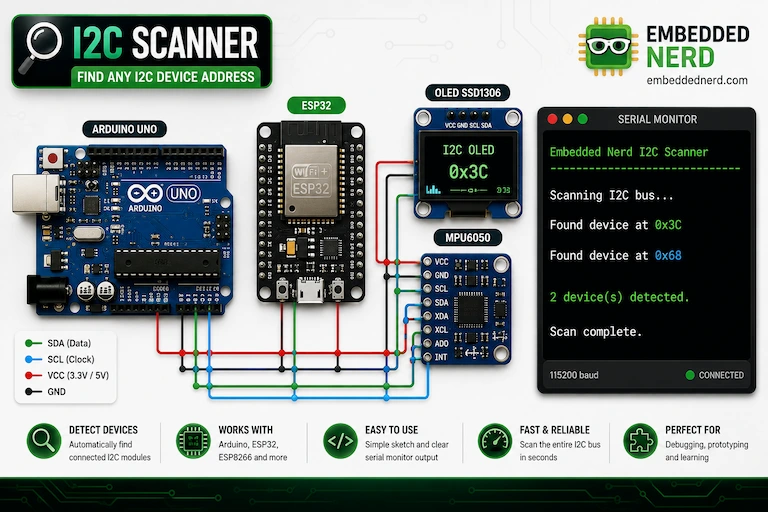
Run an I2C scanner if necessary.
Snake Moves Randomly
Possible causes:
- MPU6050 not calibrated
- Sensor vibration
- Threshold values too low
Increasing the tilt threshold usually improves stability.
Why Use an MPU6050?
Compared to push buttons, the MPU6050 provides a much more interactive gaming experience.
Advantages include:
- No mechanical buttons
- Natural motion control
- Fast response
- Great introduction to accelerometers
- Easy integration with ESP32
GitHub Source Code
The complete ESP32 Snake Game source code is available in the GitHub repository.
The repository includes:
- Complete Arduino sketch
- Wiring diagram
- Required libraries
- Images
- Project files
Related Tutorials
Conclusion
Building a Snake game with an ESP32, MPU6050 and OLED display is an excellent way to learn embedded programming while creating a fun interactive project.
This project introduces several important concepts including I2C communication, motion sensing, OLED graphics, game logic and real-time input handling.
Once completed, you can extend it with additional features such as sound effects, wireless scoreboards or even multiplayer gameplay, making it a great foundation for more advanced ESP32 game development.